- Published on
Stop Treating GPUs Like Permanent Infrastructure
- Authors

- Name
- Christophe Schmitz
TL;DR
In a classic OpenShift Kubernetes cluster, the control plane and worker nodes are part of the same cluster footprint.
With OpenShift Hosted Control Planes, that model changes. The control plane of a hosted cluster runs on a separate management cluster, while the worker nodes run somewhere else.
I wanted to test what that means for hybrid AI and sovereignty:
Can I keep the hosted OpenShift control plane on my bare-metal cluster, while running the hosted cluster worker nodes in a hyperscaler such as AWS for dynamic access to GPU capacity?
This is relevant for federal government and sovereignty-sensitive organisations. While this is not full workload sovereignty, it provides sovereign control-plane anchoring with elastic cloud execution:
- The hosted cluster workers still run in AWS. That means workload execution, including GPU-based jobs, temporary data, and node-level runtime are in AWS during execution.
- The hosted control plane, cluster state, lifecycle control, and governance model remain anchored on the bare-metal management cluster.

The PoC leverages the Hosted Control Plane (HCP) capabilities in OpenShift. This work was done with:
- Bare-metal OpenShift 4.21 as the management cluster
- Hosted Control Planes running on that cluster
- Worker nodes in AWS, including GPU workers consumed by OpenShift AI
- Manual scaling of the AWS GPU node pool down when finished
This aligns with where HCP is heading: smarter control-plane sizing and autoscaling node pools from and to zero, initially introduced for ROSA with HCP.
Table of Contents
- TL;DR
- Why this matters
- The architectural idea
- Why accelerator evolution matters
- Why not keep all GPU infrastructure on-prem?
- Why not just use a native cloud AI service?
- Creating the hosted cluster
- What about networking?
- Running OpenShift AI on the hosted cluster
- Why this matters for federal government
- Why this is a Red Hat conversation
- Conclusion
Why this matters
I keep seeing the same pattern in sovereign AI conversations.
Everyone wants AI. Everyone wants control. Everyone wants GPUs. But nobody can afford to buy a pile of GPUs that sit mostly idle, especially when the accelerator market is moving so quickly.
That's the problem: utilisation risk today, obsolescence risk tomorrow.

Some AI workloads are permanent, but many are prone to burst patterns:
- Model testing
- Inference experiments
- Benchmark runs
- Short-lived RAG prototypes
- Temporary test and dev environments
- Temporary GPU-backed validation
For those workloads, permanent GPU infrastructure is an expensive answer to a temporary problem. It also risks locking teams into today's accelerator choices before they really understand what tomorrow's workloads will need.
So I wanted to test a different model:
- Keep the OpenShift control plane local.
- Run the workers somewhere else.
- Use GPU capacity only when needed.
- Scale it back down when done.
That is where OpenShift Hosted Control Planes becomes really interesting.
The architectural idea
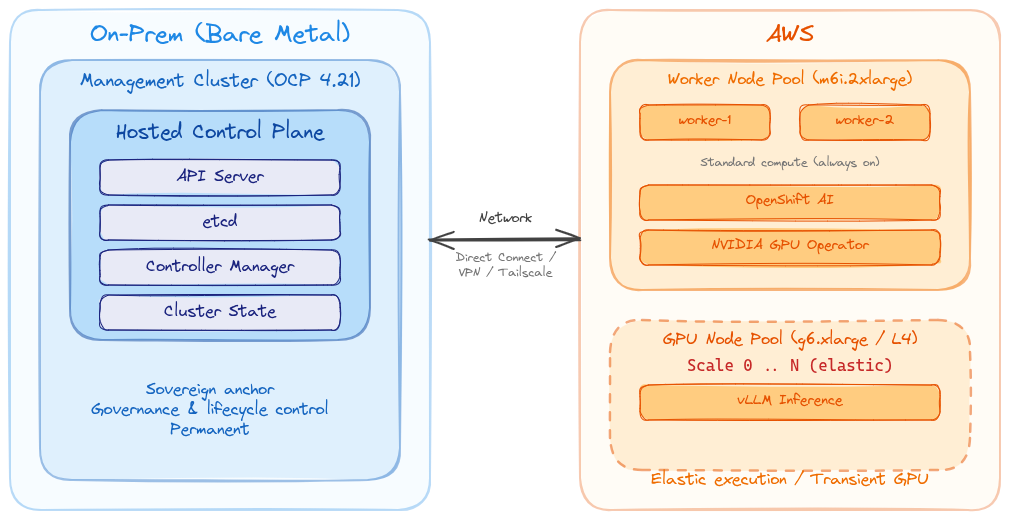
The idea is simple, but worth stating carefully:
Keep the control-plane anchor local. Treat cloud workers as elastic execution capacity.
With Hosted Control Planes, the control plane for a hosted cluster runs as workloads on a management cluster. The worker nodes can live somewhere else.
In my PoC:
- The management cluster runs on bare metal.
- The hosted control plane runs on that bare-metal cluster.
- The hosted cluster workers run in AWS, on a dedicated node pool.
- OpenShift AI GPU workloads run on the hosted cluster, on a dedicated GPU node pool.
- When I no longer need the GPU capacity, I scale the node pool down to zero — or better, let OpenShift do it automatically.
The expensive and fast-moving part of the environment (the GPU worker capacity) becomes transient, while the local part (the OpenShift control plane, cluster state, lifecycle control, and governance anchor) remains on the bare-metal management cluster.
Why accelerator evolution matters
There's another reason I'm cautious about treating GPUs as permanent infrastructure: accelerator technology is moving fast. Really fast. The inference use case is still relatively new and evolving quickly — optimised accelerators for this workload are improving at a pace that dwarfs traditional CPU gains, and NVIDIA's competitors are only starting to catch up.
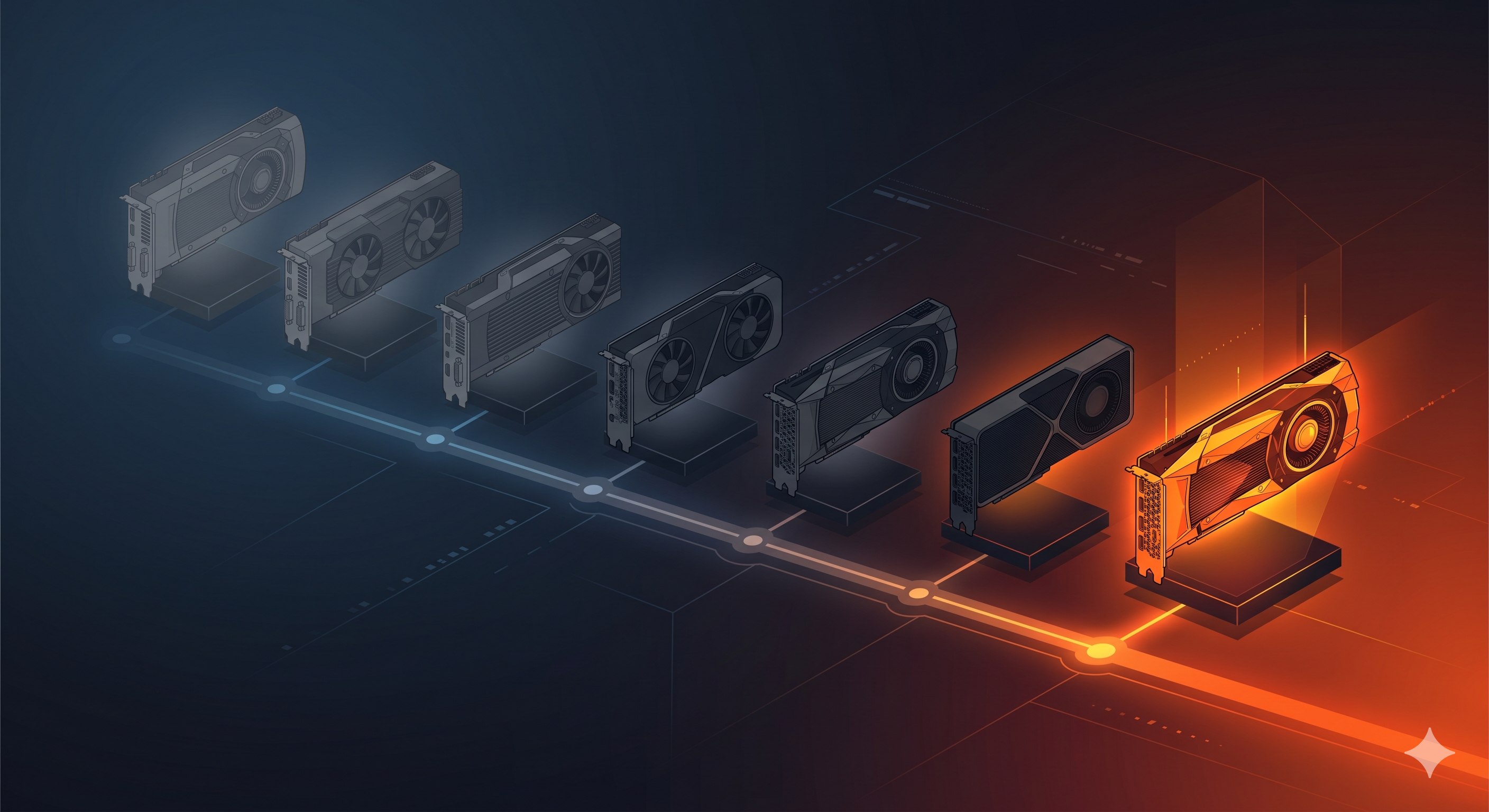
The current enterprise AI conversation is dominated by high-end GPUs such as H100 and H200. Those are powerful accelerators, and they will remain useful for a long time. But the market is not standing still.
Newer accelerators are increasingly designed specifically for AI workloads, with improvements around inference efficiency, memory bandwidth, power consumption, interconnects, and price/performance. This matters because GPUs were not originally designed for AI. They became incredibly useful for AI because the parallel computation model mapped well to deep learning workloads. Now the market is moving toward accelerators that are more explicitly optimised for AI, especially inference workload.
So what happens to the H100 and H200 infrastructure organisations are buying today?
It won't suddenly become useless. It'll become tiered capacity. Some of it will continue to be useful for training, fine-tuning, inference, internal platforms, and less demanding workloads. But some of it may also become expensive capacity that is no longer the best fit for newer models, newer serving patterns, or better performance-per-watt options.
That's the risk.
I'm not saying "don't buy GPUs". The point is:
Do not buy permanent GPU estates before you understand your workload profile.
A hybrid pattern gives teams a way to experiment first. Use elastic capacity to understand the models, serving stack, concurrency requirements, memory needs, power profile, and operational model. Then make better decisions about what accelerator capacity should become permanent.
Why not keep all GPU infrastructure on-prem?

Sometimes you should.
If the workload is highly sensitive, consistently utilised, latency-sensitive, or disconnected, then on-prem GPU infrastructure is the right answer. But not every AI workload is like that. In fact, a lot of early AI platform work is experimental:
- Will this model work?
- How much GPU do we need?
- Is this inference pattern viable?
- What is the right serving stack?
- Can the team operate this?
- Should this become a permanent service?
Buying permanent infrastructure before answering those questions can be premature, especially when accelerator generations are changing quickly. Answering those questions early will inform what to buy, how much to buy, and what should remain elastic rather than permanent.
Why not just use a native cloud AI service?

Native cloud AI services can be useful — they're fast to consume and operationally convenient.
But in federal government and regulated organisations, the questions are usually more complicated:
- Where is the data?
- Who controls the platform?
- What is the operating model?
- Can we run disconnected?
- Can we move the workload later?
- Can we use the same platform pattern on-prem and in cloud?
- Can security teams apply consistent policy?
This is where hybrid OpenShift shines. The goal isn't just to consume compute — it's to build a consistent platform that works across a variety of scenarios. OpenShift AI running on OpenShift gives you a more portable pattern than tying every experiment to a single cloud service abstraction.
Creating the hosted cluster
Before worrying about OpenShift AI, GPUs, or vLLM, the first step is to create the hosted OpenShift cluster itself.
The important design choice is that the hosted control plane runs on the bare-metal management cluster, while the worker node pool runs in AWS.
At a high level, the flow looks like this:
- Install and configure Hosted Control Planes on the management cluster.
- Prepare AWS credentials and IAM permissions for HCP.
- Choose the AWS region, base domain, release image, and instance type.
- Create the hosted cluster with the
hcpCLI. - Confirm that the hosted control plane is healthy.
- Add or scale worker node pools as needed.
The actual command will depend on your environment, but the shape of it looks like this:
hcp create cluster aws \
  --name ai \
  --namespace hcp-ai \
  --infra-id ai \
  --region ap-southeast-2 \
  --base-domain hcp.example.com \
  --pull-secret ./pull-secret.json \
  --sts-creds ./sts-creds.json \
  --role-arn arn:aws:iam::<account-id>:role/<hcp-role> \
  --node-pool-replicas 2 \
  --instance-type m6i.2xlarge \
  --release-image quay.io/openshift-release-dev/ocp-release:4.21.12-x86_64 \
  --vpc-cidr 10.1.0.0/16 \
  --etcd-storage-class <management-cluster-storage-class>
I start with two standard EC2 replicas — enough to deploy operators and workloads. Once the cluster is up and running, it becomes easy to add additional node pools via the Advanced Cluster Management console (ACM), including GPU-capable node pools.
What about networking?
When connecting on-prem infrastructure with cloud infrastructure, networking becomes a central discussion point.
In an enterprise or government AWS environment, approved private connectivity patterns such as AWS Direct Connect or site-to-site VPN would typically be in place.
For a quick PoC from a home lab, something like Tailscale with subnet routers can bridge on-prem with AWS instances. Be mindful that this is typically not an approved network path at work — but it is a practical way to validate the pattern before investing in production connectivity.
From a device connected to the same network the bare-metal OpenShift cluster is running on (in this case 192.168.6.0/24), create a local subnet router:
sudo tailscale up \
    --accept-routes \
    --advertise-routes=192.168.6.0/24 \
    --hostname=local-subnet-router \
    --snat-subnet-routes=false
For the opposite direction, create an EC2 instance (a t3.small or smaller is enough) in the VPC hosting the remote workers:
sudo tailscale up \
    --advertise-routes=10.1.0.0/16 \
    --accept-routes \
    --snat-subnet-routes=false \
    --hostname=aws-subnet-router
Subnet routes must be approved on the Tailscale console, either manually or via a Tailscale policy.
The on-prem OpenShift nodes need a route to the AWS VPC. This can be applied via a MachineConfig with a NetworkManager dispatcher script:
apiVersion: machineconfiguration.openshift.io/v1
kind: MachineConfig
metadata:
  labels:
    machineconfiguration.openshift.io/role: master
  name: 99-aws-vpc-route-master
spec:
  config:
    ignition:
      version: 3.2.0
    storage:
      files:
      - contents:
          source: data:text/plain;charset=utf-8;base64,IyEvYmluL2Jhc2gKaWYgWyAiJDIiID0gInVwIiBdOyB0aGVuCiAgaXAgcm91dGUgYWRkIDEwLjEuMC4wLzE2IHZpYSAxOTIuMTY4LjYuMSBkZXYgYnItZXggMj4vZGV2L251bGwgfHwgdHJ1ZQpmaQo=
        mode: 0755
        path: /etc/NetworkManager/dispatcher.d/10-aws-route
The base64-encoded script simply adds the routes when an interface comes up:
#!/bin/bash
if [ "$2" = "up" ]; then
  ip route add 10.1.0.0/16 via 192.168.6.1 dev br-ex 2>/dev/null || true
fi
IP forwarding (net.ipv4.ip_forward=1) must also be enabled on both subnet routers.
The important detail: use --snat-subnet-routes=false on both subnet routers. Without this, source IPs are NATed and the OVN Geneve tunnels between the hosted control plane and the workers will not function correctly.
Running OpenShift AI on the hosted cluster
Once the hosted cluster is available and the AWS worker node pool is running, the AI layer becomes straightforward.
The hosted cluster can run:
- OpenShift AI
- NVIDIA GPU Operator
- Node Feature Discovery
- GPU-enabled workloads such as vLLM inference services
The workflow looks like this:
- Bring up the hosted cluster.
- Scale up an AWS GPU worker node pool (e.g.
g6.xlargewith NVIDIA L4 as a cost-effective GPU node to get started with). - Install the NVIDIA GPU Operator and Node Feature Discovery — the GPU is automatically detected, the driver compiled, and the node made schedulable for GPU workloads.
- Install OpenShift AI and deploy inference or training workloads.
- Scale down the GPU worker node pool when finished — or better, use the dynamic node pool scaling features recently introduced.
The GPU node pool can be tainted with nvidia.com/gpu:NoSchedule to ensure only GPU workloads land on those expensive instances. This taint can be configured directly on the NodePool resource so that it applies automatically to every node that joins, even when scaling from zero.
Why this matters for federal government
Federal government architecture is shaped by constraints:
- Sovereignty
- Security
- Auditability
- Data control
- Platform assurance
- Procurement realities
- Long infrastructure lifecycles
AI adds pressure to all of those.
It introduces expensive accelerators, fast-moving software stacks, fast-moving hardware generations, uncertain demand, and a strong need for experimentation.
A Hosted Control Planes pattern gives architects another option:
Keep the control plane, cluster state, and governance anchor close. Use cloud workers for suitable workloads and temporary capacity. Move faster without pretending every workload is automatically sovereign.
This is the kind of pattern that becomes more important as organisations move from AI experiments to AI platforms. It gives teams a way to test elastic AI capacity while still being honest about where the workload actually runs. It also lines up with the current HCP resource-management direction: dynamic control-plane scaling, plus node pools that can scale from and to zero for the right use cases. GPU-backed AI workloads are a perfect example of why that matters.
Why this is a Red Hat conversation
This isn't just a Kubernetes trick.
The real value is platform consistency:
- OpenShift on bare metal
- OpenShift hosted clusters
- OpenShift worker nodes in AWS
- OpenShift AI for the AI platform layer
- NVIDIA GPU Operator for accelerator enablement
- vLLM for inference workloads
Teams aren't learning a completely different platform every time they move between on-prem and cloud. For federal organisations trying to adopt AI without creating yet another platform silo, that matters a lot.
Conclusion
When thinking about hybrid workloads, including AI workloads, the questions are:
What must remain under sovereign control? What can run as elastic capacity? What should be persistent? What should be disposable?
Hosted Control Planes gives us a practical way to explore those questions with OpenShift.
For federal government, this matters because AI adoption will require both control and speed. But the distinction needs to remain clear: this pattern does not make cloud-executed workloads sovereign by magic. It keeps the control-plane anchor local while using AWS workers for suitable execution capacity.
The newer HCP resource-management work strengthens the argument, but it also sharpens the wording we should use. The pattern is not simply "scale everything to zero everywhere." It is more precise than that: right-size the control plane, keep baseline capacity where the platform requires it, and scale expensive specialised capacity — such as GPU node pools — only when needed.
Trying to solve every AI requirement by overbuilding static infrastructure will be expensive, and it increases the risk of committing too early to an accelerator generation before the workload profile is clear. Trying to solve it by moving everything to cloud will not fit every sovereignty requirement.
The better pattern is somewhere in between:
Local control-plane anchoring. Elastic cloud execution for suitable workloads. Consistent OpenShift platform.
Or, to put it more bluntly:
Stop treating GPUs like permanent infrastructure.